Wednesday, May 22, 2024

JVM(Java Virtual Machine)

 The JVM (Java Virtual Machine) is an essential component of the Java Runtime Environment (JRE). Its primary function is to execute Java bytecode, which is the compiled form of Java source code. Here's what it does and an overview of its architecture:

1. Execution of Java Bytecode:

  • The JVM executes Java bytecode, which is the intermediate representation of Java programs generated by the Java compiler (javac). Instead of directly executing machine code, Java programs are compiled into bytecode, which can run on any system with a compatible JVM.
  • This bytecode is platform-independent, allowing Java programs to be "write once, run anywhere."

2. Memory Management:

  • JVM manages memory allocation for Java applications. It handles tasks like allocating memory for objects, garbage collection (reclaiming memory occupied by objects that are no longer needed), and managing memory leaks.

3. Garbage Collection:

  • JVM's garbage collector automatically manages memory by reclaiming memory from objects that are no longer in use. This helps developers avoid manual memory management, reducing the likelihood of memory leaks and other memory-related issues.

4. Platform Independence:

  • One of the key features of JVM is platform independence. Java bytecode can run on any system with a compatible JVM, regardless of the underlying hardware and operating system. This allows Java applications to be highly portable.

5. Security:

  • JVM provides a secure execution environment for Java applications. It includes features like bytecode verification to ensure that code loaded by the JVM adheres to Java's safety and security restrictions, helping to prevent unauthorized access and malicious activities.

JVM Architecture:

Let's understand the internal architecture of JVM. It contains a classloader, memory area, execution engine etc.
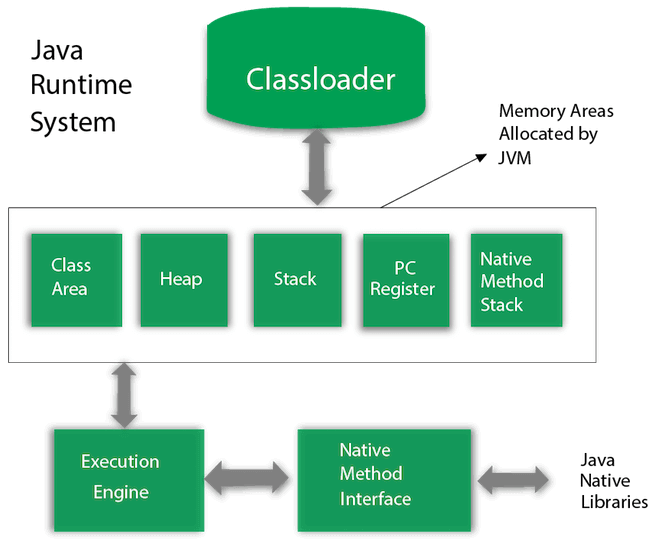
JVM Architecture

  • JVM architecture consists of several key components, including:
    • Class Loader: Responsible for loading classes into the JVM.
    • Class Area: Memory area where class metadata, constant pool, and static fields are stored.
    • Heap: Memory area where objects are allocated. It's managed by the garbage collector.
    • Method Area: Memory area where class structures (bytecode, methods, and runtime constant pool) are stored.
    • Program Counter (PC) Register: Keeps track of the currently executing instruction.
    • Java Stack: Memory area for storing method invocation records, local variables, and intermediate results.
    • Native Method Stack: Similar to the Java Stack but used for native (non-Java) methods.
    • Execution Engine: Responsible for executing bytecode instructions.

Overall, the JVM provides a robust runtime environment for executing Java applications, handling memory management, security, and platform independence. Its architecture ensures efficient execution of Java bytecode while providing a high level of portability and security.
Difference between JRE,JDK and JVM

 JRE, JDK, and JVM are all essential components in the Java programming environment, but they serve different purposes:

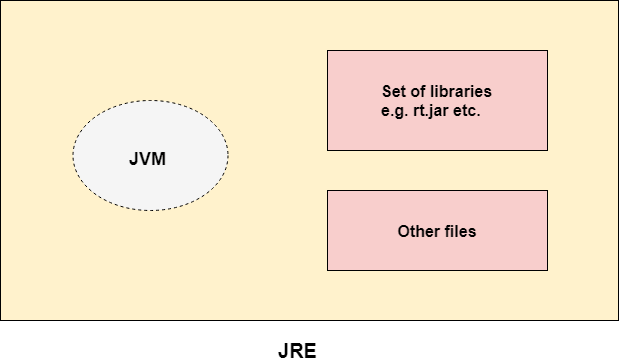
  1. JRE (Java Runtime Environment):

    • JRE is the set of software tools that allow a computer to run Java applications.
    • It includes the Java Virtual Machine (JVM), class libraries, and other supporting files that are necessary for running Java applications.
    • JRE is primarily used by end-users who only need to run Java applications but do not need to develop them.
    • The implementation of JVM is also actively released by other companies besides Sun Micro Systems.

      JRE
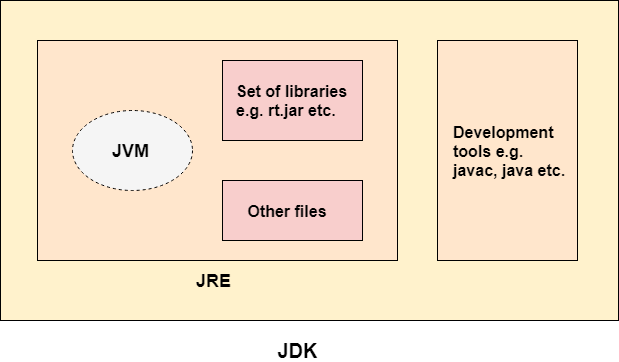
  2. JDK (Java Development Kit):

    • JDK is a software development kit used by developers to create Java applications.
    • It includes the JRE along with development tools like the Java compiler (Javac), debugger, and other utilities needed for developing Java applications.
    • JDK is used by developers for writing, compiling, debugging, and running Java code.
    • The JDK contains a private Java Virtual Machine (JVM) and a few other resources such as an interpreter/loader (java), a compiler (javac), an archiver (jar), a documentation generator (Javadoc), etc. to complete the development of a Java Application.JDK

  3. JVM (Java Virtual Machine):

    • JVM is an abstract computing machine that provides the runtime environment in which Java bytecode can be executed.
    • It acts as an interpreter for Java bytecode, translating it into machine-specific instructions that can be executed by the underlying hardware.
    • JVM is responsible for memory management, garbage collection, and other runtime activities that are essential for executing Java applications.
    • It is platform-dependent, meaning different implementations of JVM exist for different operating systems.

In summary, JRE is for running Java applications, JDK is for developing Java applications, and JVM is the runtime environment that executes Java bytecode.

Monday, May 20, 2024

Simple Java Program | Hello World Example

 First Java Program:

Here's a simple "Hello, World!" program in Java:

ja
public class HelloWorld {
public static void main(String[] args)
 System.out.println("Hello, World!"); }
 }

Explanation:

  • public class HelloWorld: This line declares a class named HelloWorld. In Java, every executable program is defined within a class.
  • public static void main(String[] args): This is the main method. It's the entry point for the program. When you execute a Java program, the JVM (Java Virtual Machine) looks for this method to start execution.
  • System.out.println("Hello, World!");: This line prints "Hello, World!" to the console.

Requirements for Execution:

To execute this Java program, you need:

  1. Java Development Kit (JDK): You must have the JDK installed on your computer. The JDK includes tools for developing and running Java programs, such as the Java compiler (javac) and the Java Virtual Machine (JVM) to execute Java bytecode.

  2. Java Compiler: Use the javac command to compile your Java source code into bytecode. Save the above code in a file named HelloWorld.java. Open a command prompt or terminal and navigate to the directory containing HelloWorld.java, then run:

    javac HelloWorld.java

    This command will compile HelloWorld.java into HelloWorld.class.

  3. Java Runtime Environment (JRE): To execute the compiled bytecode, you need the JRE installed. The JRE includes the JVM, which is responsible for running Java bytecode.

  4. Execution: After compiling successfully, you can run the program using the java command followed by the name of the class containing the main method (without the .class extension). In this case:

    java HelloWorld

    This command will execute the HelloWorld class, and you'll see the output "Hello, World!" printed on the console.

Make sure your environment variables are set up correctly to point to the JDK and JRE directories. After ensuring these requirements are met, you can create and execute Java programs on your system.

JVM(Java Virtual Machine)

  The JVM (Java Virtual Machine) is an essential component of the Java Runtime Environment (JRE). Its primary function is to execute Java by...